

When chatting with a Summon, you can adjust advanced settings to personalize the experience. Tap the flame icon in the upper-right corner of the chat screen to open the Chat Settings Tray.
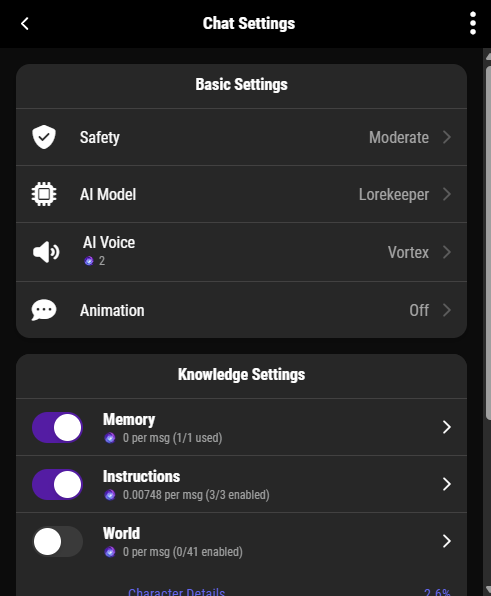
Safety #
- Safe → Strict filtering.
- Moderate → Balanced.
- Mature (18+) → Unrestricted content for adult roleplay.
AI Model #
- Lore Keeper → Creative, fast, tuned for roleplay.
- Sentinel → Strong memory, safe, strict filters.
- Arcanum → Adaptive, always improving.
Chat Animation #
Choose how text responses appear (e.g., typewriter effect for cinematic pacing).
AI Voice #
Enable AI Voice to let your Summon read responses aloud. Cost: 2 Mana per prompt.
Knowledge Settings #
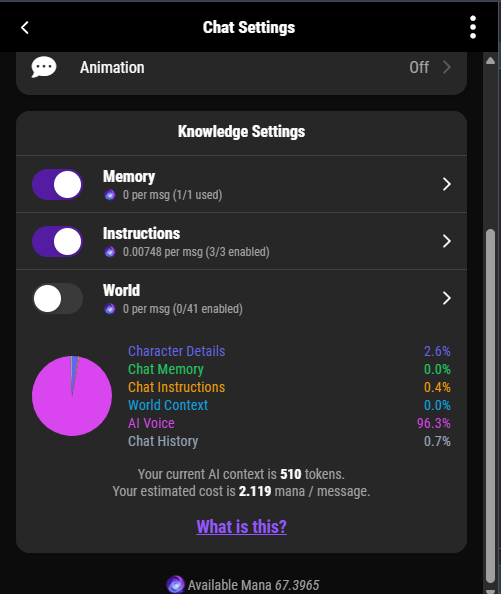
Knowledge Settings give you full control over what your Summon knows, and how much context is used during conversations. These options are now centralized in the Chat Settings Tray for easy access.
You can toggle:
- Instructions: Define your character’s tone, speaking style, and emotional response.
✅ Recommended: Keep ON, it enriches the personality without adding extra cost. - Memory: Allows the AI to remember past chats and interactions. Useful for long-term character development and narrative consistency.
💡 Note: Turning Memory ON increases context and Mana cost. - World Knowledge: Gives your Summon awareness of its World, Location, Equipment, and other Characters. Best for immersive roleplay, but also increases chat cost.
🎯 Pro Tip:
- For casual chats: Use Instructions only to keep costs low.
- For story-rich conversations: Turn on Memory and World Knowledge as needed.
As you adjust these options, a real-time Mana cost pie chart will update to reflect your selections.
⚠️ The more context you enable, the higher the cost. Choose based on your story needs and Mana budget.
Memory Settings #
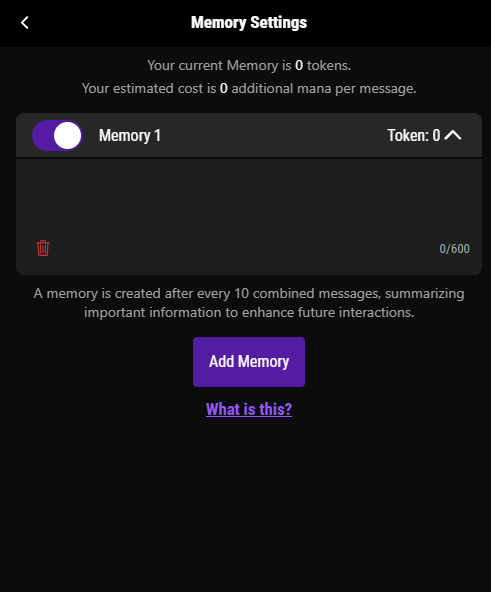
AI memory is now optional and controlled directly in the Chat Settings Tray.
- Turning Memory ON allows the AI to retain context across multiple chats.
- When OFF, the AI will only respond based on the current message.
💡 Memory uses more context, which increases Mana cost. Use it only when you need deeper continuity or storytelling.
We’re continuing to improve memory retention in future updates to ensure smoother long-form interactions.
Instruction Settings #
- Instructions define your Summon’s tone, emotional expression, speaking style, and personality traits. These settings help the AI stay consistent with how your character behaves and talks.
- This is the default and most recommended setting to keep ON at all times.
- It doesn’t increase Mana cost, but it greatly improves character consistency.
Worlds Settings #
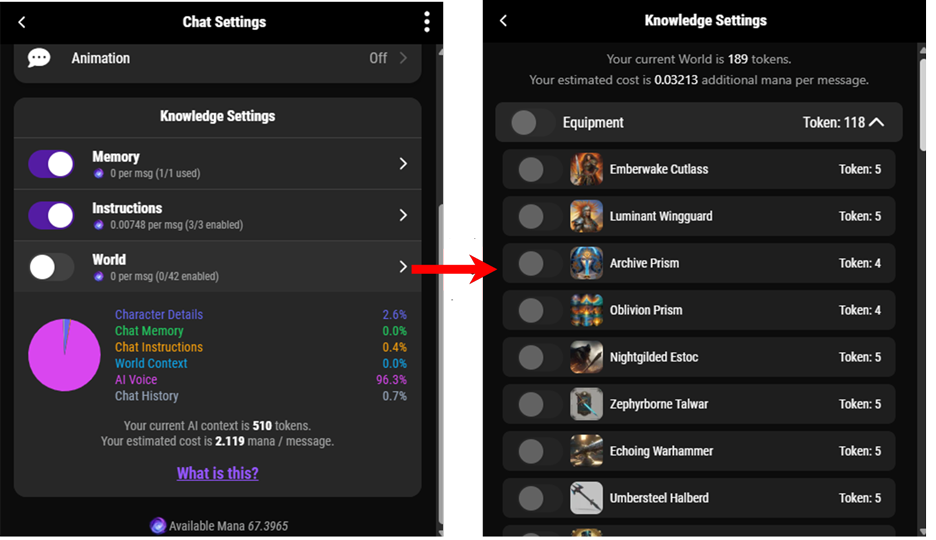
World Knowledge gives your Summon access to your custom world content. When enabled, the AI becomes aware of:
- World & Location it’s placed in
- Other Characters in the same World
- Equipment and items associated with that Summon
- Any additional custom knowledge you’ve provided
This allows for richer, immersive conversations, especially in Bound Chats.
- ✅ Recommended for deep fantasy worldbuilding and party-style roleplay
- ⚠️ Enabling World Knowledge adds significant context and will increase Mana cost per message
🔐 Bound Summons automatically access their own World and Equipment unless this is manually disabled in settings.
Types of World Knowledge You Can Configure #
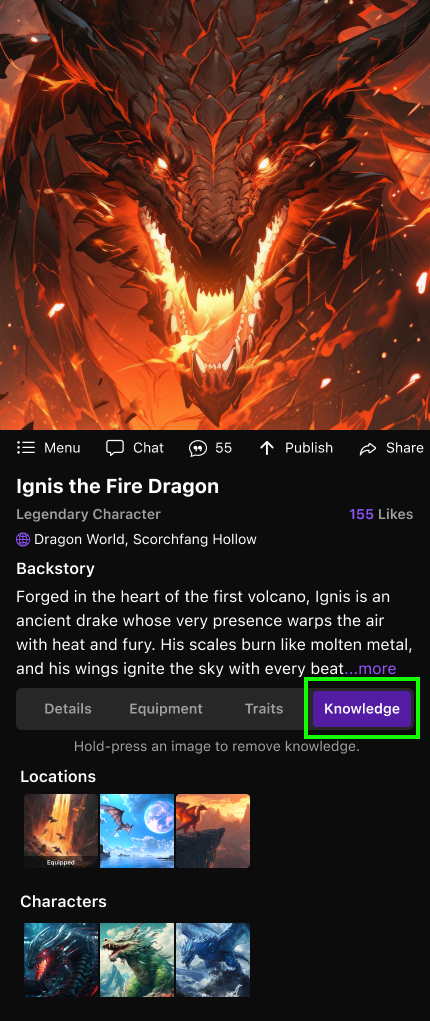
Within the Knowledge Tab on a Character’s Overview, you can extend or restrict what your Summon knows:
- Equipment Knowledge
- Characters can recognize and use their equipped weapons, armor, items, or spells.
- Example: A knight bound to a sword will naturally know it is called “Blade of Dawn” and can reference it in dialogue or actions.
- Other Characters
- You can allow a Summon to know about other characters in the same World.
- Example: A wizard might recognize their apprentice, but you can disable this if you want the apprentice to remain unknown at the start of the story.
- Locations
- Characters may know about other places in the World (cities, dungeons, forests).
- Example: A ranger could know the paths to “Whispering Woods,” while a newcomer may only know their home village.
- Custom Knowledge (User-Defined Lore)
- Add unique knowledge specific to your World’s lore.
- Example: A prophecy, a cultural festival, or details about a forgotten war.
- This lets you inject narrative depth and hidden context that your Summon can draw upon.
Customizing Knowledge Access #
- On the Character Overview > Knowledge Tab
- Toggle which types of knowledge are enabled.
- Add custom lore entries for specialized knowledge.
- Restrict knowledge to prevent spoilers or to simulate ignorance.
Tips for Use #
- Immersion: Limit knowledge so characters only learn what they should in-story.
- Gameplay Balance: Hide powerful items, spells, or locations until characters discover them naturally.
- World Consistency: Share knowledge across related characters to reinforce relationships and continuity.
⚡ Tip: For maximum immersion, enable Memory + Instructions + World Knowledge. For efficient chats, stick to Regular Characters with minimal toggles.